I told you I just can't stop adding functionality to my Google Sheets Essbase add-on. Now you can ZoomIn to a member's children both in rows and columns.
I've also added indentation to the member names to reflect their level. This is much the same as in the Excel add-in.
Next I may add the ability to ZoomOut to a member's parent.
Please let me know what you think in the comments.
Unlock your OLAP data with ExoInsight. Get your Essbase and Analysis Services metadata and data in the table format that downstream tools - reporting and data warehouses - expect. Head on over to the Casabase website for more information.
Sunday, August 9, 2015
Thursday, August 6, 2015
Google Sheets Essbase add-on
I just can't seem to abandon the idea of developing a Google Sheets Essbase add-on. Maybe I'm a little ahead of my time, or maybe I've got some of this guy in me. I don't know. What I do know is that every time I fire up my personal Essbase development environment, a Google Sheets script editor seems to also magically appear. If I build it, maybe they will come.
With Oracle moving more and more services to The Cloud, I have to think that companies' resistance to also moving at least some users to cloud-based office productivity tools like Google Sheets is destined to crumble. After all, the security model of Oracle Planning and Budgeting Cloud Services is exactly the same as Google Sheets. All your data is already in the cloud, so why not do your analysis there, too? And since a spreadsheet is really only useful if you can share it with others in your organization, which is where Google Sheets excels (sorry for the punny), why not eliminate the Excel middleman?
As the animation below demonstrates, the add-on currently has the ability to retrieve data from a range using the Essbase Query By Example (”QBE”) paradigm explained by Tim Tow in a blog post here. It actually even eliminates the need to prefix numeric member names with a single quote. This requirement can be extremely vexing to both users and admins alike. The add-on accomplishes all of this through the XMLA web service that you already have running through Provider Services. No additional software currently need be installed.
Of course, in order to also provide the ability to send updated data (a.k.a. lock & send; a.k.a. L&S) back to the Essbase server, it would be necessary to either install a Java API-based web application in-house or to enable the new Essbase Web Services that no one, outside of Oracle, appears to be using.


Before I expend any more effort on this add-on, am I tilting at windmills? Please let me know in the comments.
-Harry
Monday, June 1, 2015
Essbase Varying Attributes: Usable at last?
I don't know about everyone else, but I have several use cases that have always screamed out for varying attributes. I'm thinking reorgs here in particular. I've always pushed back against having two cubes: pre- and post-reorg hierarchies. Sometimes I win that battle. Most times not.
When varying attributes were added a few years ago, I literally did a little happy dance. It ended almost before it started, however, when I read that this functionality is not present in load rules, MaxL, or the Java API.
In fact, you only have two options to maintain varying attributes. First, you can manually maintain them in EAS. This is not practical with a nontrivial number of members, whose attributes may also change. Second, you can use Essbase Studio. I don't know anyone else's experiences with Studio, but I'd probably retire if forced to use it on a regular basis. I'm only semi-joking.
So recently I started working on a program that enables maintenance of varying attributes from the command line. The VaryingAttributes.exe program is called thusly:
VaryingAttributes.exe "servername" "username" "password" "Application" "Database" "IndependentDimension1" "IndependentDimension2" "BaseDimension" "AttributeDimension" "ConfigFileWithAttributeMappings"
For example:
VaryingAttributes.exe "epm" "admin" "password" "Varying" "Attribs" "Market" "Year" "Product" "Pkg Type" "VaryingAttributes.conf"
Sample contents for the tab-delimited VaryingAttributes.conf file:
Base_Member Attribute_Member Range_IndDim1Member Range_IndDim2Member1 Range_IndDim2Member2
300-10 Can Massachusetts Jan Apr
300-10 Bottle Florida Jun Dec
300-30 Can Louisiana Mar Apr
300-30 Bottle Oregon May Oct
Here's how the program works:
1) all current varying attributes (Can, Bottle) for the Attribute Dimension (Pkg Type) are removed from the Base Dimension (Product)
2) the 2 Independent Dimensions (Market, Year) are reassociated to the Attribute Dimension (Pkg Type) for the Base Dimension (Product)
3) the varying attributes specified in the config file (VaryingAttributes.conf) are applied and the outline is saved
4) ????
5) Profit!
I still have some more polishing and testing to do, mostly around error handling. Despite the exe extension above, VaryingAttributes can also be compiled to run on Linux. I don't have a UNIX box to compile/test on, but it would also be trivial to port it to Solaris/AIX/HP if there is demand.
Would anyone find this program useful? And by "useful", I mean how much would you be willing to pay for it? And by "you", I mean your company that already paid millions for Essbase licenses and consulting. Please let me know in the comments.
When varying attributes were added a few years ago, I literally did a little happy dance. It ended almost before it started, however, when I read that this functionality is not present in load rules, MaxL, or the Java API.
In fact, you only have two options to maintain varying attributes. First, you can manually maintain them in EAS. This is not practical with a nontrivial number of members, whose attributes may also change. Second, you can use Essbase Studio. I don't know anyone else's experiences with Studio, but I'd probably retire if forced to use it on a regular basis. I'm only semi-joking.
So recently I started working on a program that enables maintenance of varying attributes from the command line. The VaryingAttributes.exe program is called thusly:
VaryingAttributes.exe "servername" "username" "password" "Application" "Database" "IndependentDimension1" "IndependentDimension2" "BaseDimension" "AttributeDimension" "ConfigFileWithAttributeMappings"
For example:
VaryingAttributes.exe "epm" "admin" "password" "Varying" "Attribs" "Market" "Year" "Product" "Pkg Type" "VaryingAttributes.conf"
Sample contents for the tab-delimited VaryingAttributes.conf file:
Base_Member Attribute_Member Range_IndDim1Member Range_IndDim2Member1 Range_IndDim2Member2
300-10 Can Massachusetts Jan Apr
300-10 Bottle Florida Jun Dec
300-30 Can Louisiana Mar Apr
300-30 Bottle Oregon May Oct
Here's how the program works:
1) all current varying attributes (Can, Bottle) for the Attribute Dimension (Pkg Type) are removed from the Base Dimension (Product)
2) the 2 Independent Dimensions (Market, Year) are reassociated to the Attribute Dimension (Pkg Type) for the Base Dimension (Product)
3) the varying attributes specified in the config file (VaryingAttributes.conf) are applied and the outline is saved
4) ????
5) Profit!
I still have some more polishing and testing to do, mostly around error handling. Despite the exe extension above, VaryingAttributes can also be compiled to run on Linux. I don't have a UNIX box to compile/test on, but it would also be trivial to port it to Solaris/AIX/HP if there is demand.
Would anyone find this program useful? And by "useful", I mean how much would you be willing to pay for it? And by "you", I mean your company that already paid millions for Essbase licenses and consulting. Please let me know in the comments.
Monday, May 18, 2015
Pulling Essbase data into Google Sheets
I created a thread on network54 to gauge the interest in a Google Sheets Essbase add-in. I developed a sidebar that can run an MDX query against an Essbase database and return the data to a Google Sheet.
The following video demonstrates this functionality: google_sheets_POC
As I mentioned in the network54 thread, please keep in mind the inherent limitation of Google Sheets is that it can only connect to a publicly-available (i.e. internet) URL. As we all know, most companies keep Essbase walled off from the internet behind their firewall. A couple I've worked with have, however, opened up a secure port (https) to the Provider Server URL (e.g. https://CompanyAPS:13080/aps) for partner companies to access data. So it's not completely impossible that companies would be amenable to this option.
I can understand IT Security's reluctance to expose the APS https URL to an external web server, but risks can be mitigated. It is a secure (https) protocol and access is still controlled by Shared Services usernames and passwords passed from the Google Sheet.
If there is sufficient interest, the next step would be to add the functionality contained in the Essbase Excel add-in (and Smart View) to the Essbase Google Sheet add-on.
Please leave a comment if this is something you are interested in.
Thanks,
Harry Gates
Thursday, May 14, 2015
cubeSavvy Utilities 3.0 - XML Outline Editing
I was extremely excited to see XML Outline Editing show up in the 11.1.2.4 Essbase New Features. You see, I despise load rules. They are as close to evil as a software feature can get. Their hundreds of conflicting settings hidden away, just waiting to ruin your weekend. Not to mention their maddening propensity for corrupting at the least opportune moment. It's fair to say that anyone who's used them has been subjected to their fair share of pain.
The ability to export an outline to XML got us halfway there back in 11.1.2.0. Now that we can also make changes to outlines using XML, we can finally relegate these binary-only relics (a.k.a. load rules) to the dust-bin of Essbase history where they belong.
As with any Oracle product, however, there is a gotcha. In the case of XML Outline Editing there are two. The first is that this functionality is only available through the C and Java APIs. Oracle appears to be in the process of replacing EAS, having deprecated the EAS Java API. Hopefully the new tool will be better.
The second catch is one that appears to have fooled most people who have only read the Oracle announcement of this feature and not actually looked into its implementation: By XML Outline Editing Oracle doesn't mean that you can take the XML output from the MaxL "export outline" command, edit it, and load it back to the outline. The XML that allows you to make changes to the outline actually looks like this:
<mbrAdd mbrName="Yacht75" parent="Larry's Toys"></mbrAdd>
<mbrUpdate thisMbr="Yacht75">
<mbrInfo>
<alias aliasTable="default" alias="PoochYacht"/>
<alias aliasTable="LongName" alias="Fido's Oversized Pool Toy"/>
<dataStorage>storeData</dataStorage>
<consolidation>+</consolidation>
</mbrInfo>
</mbrUpdate>
As you can see, this XML looks nothing like the XML output from "export outline". The dream of being able to directly edit that XML, then load it back in is off the table for now. Oracle even made it hard to find documentation for the commands they have exposed. The Java doc has zero information. As is usually the necessary when this is the case, I had to turn to the C API. (This really makes me wonder if, in fact, the Java API has higher priority as Oracle usually claims.)
The EssBuildDimXML documentation does a good job of explaining the new XML tags/commands and even provides an example XML document. Be aware, however, that this example document doesn't work. It tries to make Ratios a sibling of Margin, rather than its parent, Profit. Since Profit is dynamic calc, code no worky. The frustrating part is that the function call asks you to include the name of a file to which errors will be logged. This also doesn't work. No matter what I tried, I couldn't get errors to log. Even worse, errors are never even thrown, so you have to actually check your outline to ensure your changes went through.
In order to make this new functionality more accessible to those who don't code using either the C or Java APIs, I've added the ability to call EssBuildDimXML from cubeSavvy Utilities. There's a new tab in the GUI and a new section in the conf file for running at the command line or in scripts.
Please download cubSavvy Utilities and let me know what you think.
-Harry Gates
Monday, April 20, 2015
cubeSavvy Utilities 2.0 - File Filters
Head on over to cubeSavvy to see the extremely helpful new feature I just added for filtering files using Essbase member selections.
Sunday, March 29, 2015
cubeSavvy Utilities – updated MDX capabilities
As promised when I introduced cubeSavvy Utilities, expanding the MDX Query functionality to handle PROPERTIES and PROPERTY_EXPR was my next task.
I’m happy to say that version 1.1, now available for download, incorporates this feature.
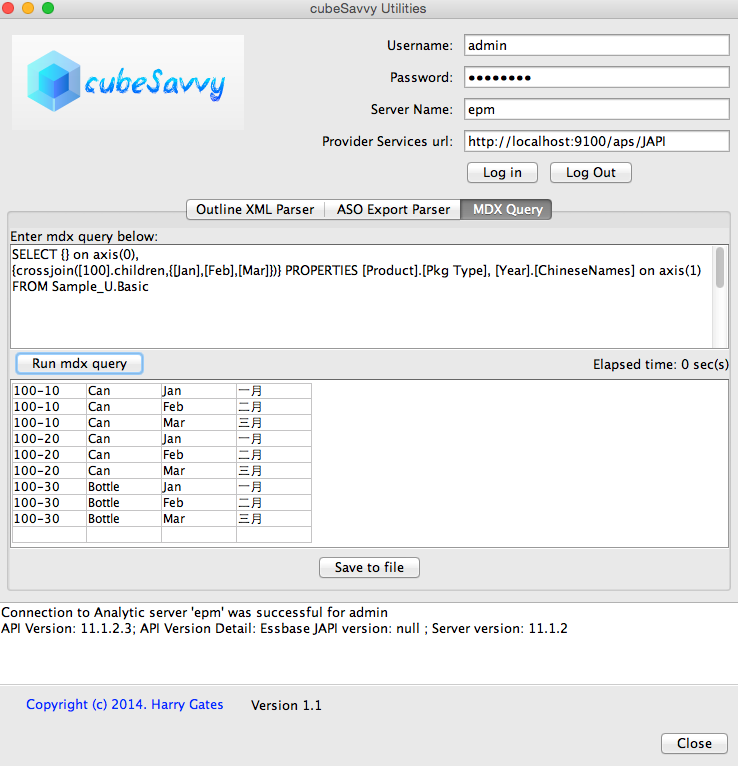
This version can also handle an empty Columns axis:
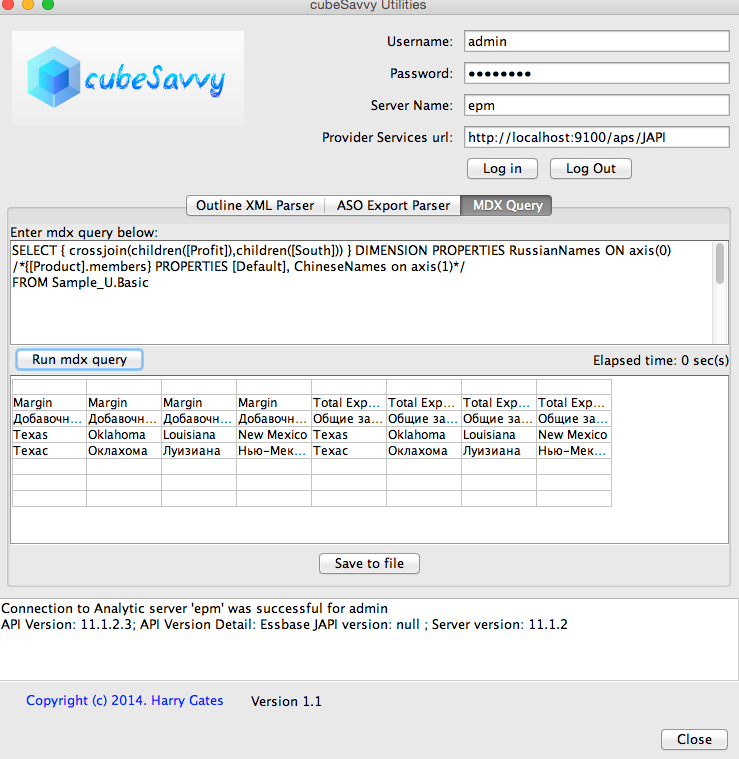
Or an empty Rows axis:
As you can see above, this gives you the ability to specify whatever you want in a Column or Row – and even by Dimension. Below is the MDX query from the empty Columns axis screenshot above. Note how I specify [Pkg Type] for the Product dimension property, but [ChineseNames] for Year.
SELECT {} on axis(0),
{crossjoin([100].children,{[Jan],[Feb],[Mar]})} PROPERTIES [Product].[Pkg Type], [Year].[ChineseNames] on axis(1)
FROM Sample_U.Basic
{crossjoin([100].children,{[Jan],[Feb],[Mar]})} PROPERTIES [Product].[Pkg Type], [Year].[ChineseNames] on axis(1)
FROM Sample_U.Basic
This flexibility gives you the power to control exactly what you want to see in the rows and columns. Therefore, I removed the 3 “Display Alias” checkboxes that were in the first version. Now you can let your MDX query do the talking. I love MDX and XMLA!
Happy querying!
Wednesday, March 25, 2015
Introducing cubeSavvy Utilities
cubeSavvy Utilities
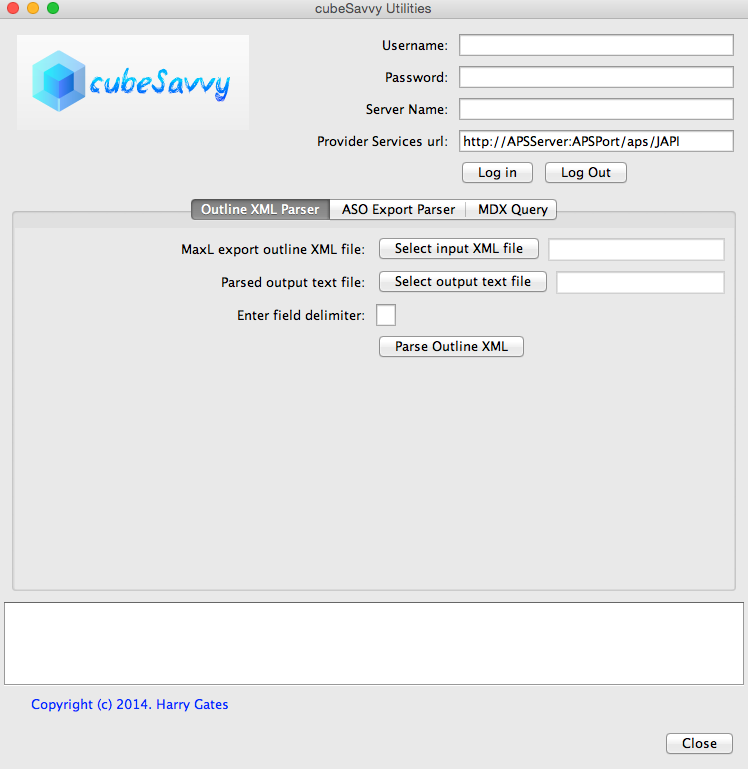
I’ve wanted to combine my various Essbase-related tools into a single, integrated tool for a while. That tool is now called cubeSavvy Utilities. It encompasses my MDX Query Tool – XMLA Edition, ASO Export Parser, and MaxL Outline XML Parser.
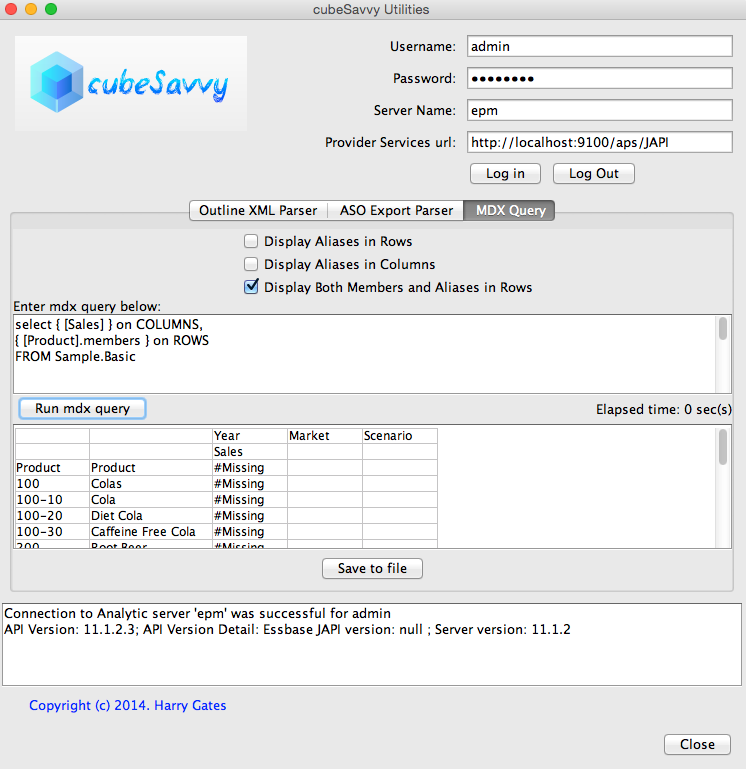
I’ve also made some enhancements to the MDX Query tool’s functionality. The most obvious is the new ability to ‘Display Both Members and Aliases in Rows’, as seen below. However, it can also now handle queries that either have just COLUMNS or just ROWS. The next version will have expanded capability to display DIMENSION PROPERTIES and PROPERTY_EXPR. These are currently just ignored.
All 3 functions have been made scriptable, with the addition of a cubeSavvyUtilities.conf configuration file to specify the same parameters found in the GUI version. The configuration file also stores Essbase server information, like user name, password, server name, and APS url. I’m extremely security conscious, so the password is stored in encrypted format. Just enter it the first time and it’s encrypted for future uses. Running from the command-line/script is as easy as: java -jar cubeSavvyUtilities.jar out. The possible flags are ‘aso’ (for the ASO Export Parser), ‘out’ (for the XML Outline Parser), and ‘mdx’ (for the MDX Query Tool).
Following are the contents of a sample cubeSavvyUtilities.conf file:
#——————————————————————————-
#cubeSavvy Utilities, copyright 2015. Harry Gates
#Place quotation marks around entries:
# ASOExportParser.FileToParse=”C:\\Documents and Settings\\harry\\asosamp.txt”
# OR
# ASOExportParser.FileToParse=”C:/Documents and Settings/harry/asosamp.txt”
#To enter new Essbase.Password
#1) Enter new password value in line: Essbase.Password=”newPassword”
#2) Set: Essbase.PasswordEncrypted=false
#3) Essbase.PasswordEncryped will be set to true the first time the program is run as a script
#To specify filters:
# ASOExportParser.Filters=[“<DESC/Qtr1″,”<DESC/Senior”,”<CHILD/Digital Cameras”]
#To specify no filters, you can delete everything after the equals sign on the line: ASOExportParser.Filters=
#The MDX Query can span multiple lines by surrounding it with three quotation marks as follows:
# MDXQuery.MDXStatement=”””
# SELECT CrossJoin([Measures].CHILDREN, [Market].CHILDREN) on columns,
# Product].Members on rows
# from Sample.Basic
# “””
Essbase.APSUrl=”http://localhost:9100/aps/JAPI”
Essbase.ServerName=”epm”
Essbase.UserName=”admin”
Essbase.Password=”password”
Essbase.PasswordEncrypted=false
#——————————————————————————-
#cubeSavvy Utilities, copyright 2015. Harry Gates
#Place quotation marks around entries:
# ASOExportParser.FileToParse=”C:\\Documents and Settings\\harry\\asosamp.txt”
# OR
# ASOExportParser.FileToParse=”C:/Documents and Settings/harry/asosamp.txt”
#To enter new Essbase.Password
#1) Enter new password value in line: Essbase.Password=”newPassword”
#2) Set: Essbase.PasswordEncrypted=false
#3) Essbase.PasswordEncryped will be set to true the first time the program is run as a script
#To specify filters:
# ASOExportParser.Filters=[“<DESC/Qtr1″,”<DESC/Senior”,”<CHILD/Digital Cameras”]
#To specify no filters, you can delete everything after the equals sign on the line: ASOExportParser.Filters=
#The MDX Query can span multiple lines by surrounding it with three quotation marks as follows:
# MDXQuery.MDXStatement=”””
# SELECT CrossJoin([Measures].CHILDREN, [Market].CHILDREN) on columns,
# Product].Members on rows
# from Sample.Basic
# “””
Essbase.APSUrl=”http://localhost:9100/aps/JAPI”
Essbase.ServerName=”epm”
Essbase.UserName=”admin”
Essbase.Password=”password”
Essbase.PasswordEncrypted=false
ASOExportParser.Application=”ASOsamp”
ASOExportParser.Database=”Sample”
ASOExportParser.FileToParse=”asosamp.txt”
ASOExportParser.OutputFile=”outputConf.txt”
ASOExportParser.Filters=[“<DESC/Qtr1″,”<DESC/Senior”,”<CHILD/Digital Cameras”,”<DESC/Sale”,”<CHILD/Price Paid”,”<DESC/Original Price”]
ASOExportParser.Database=”Sample”
ASOExportParser.FileToParse=”asosamp.txt”
ASOExportParser.OutputFile=”outputConf.txt”
ASOExportParser.Filters=[“<DESC/Qtr1″,”<DESC/Senior”,”<CHILD/Digital Cameras”,”<DESC/Sale”,”<CHILD/Price Paid”,”<DESC/Original Price”]
OutlineParser.FileToParse=”/Users/harry/test_124.xml”
OutlineParser.OutputFile=”/Users/harry/out124.txt”
OutlineParser.FieldDelimiter=”|”
OutlineParser.OutputFile=”/Users/harry/out124.txt”
OutlineParser.FieldDelimiter=”|”
MDXQuery.OutputFile=”/Users/harry/mdxResult.txt”
MDXQuery.DisplayAliasInRows=false
MDXQuery.DisplayMemberAndAliasInRows=true
MDXQuery.DisplayAliasInColumns=false
MDXQuery.MDXStatement=”””
SELECT CrossJoin([Measures].CHILDREN,[Market].CHILDREN) on columns,
[Product].Members on rows
from Sample.Basic
“””
#——————————————————————————-
MDXQuery.DisplayAliasInRows=false
MDXQuery.DisplayMemberAndAliasInRows=true
MDXQuery.DisplayAliasInColumns=false
MDXQuery.MDXStatement=”””
SELECT CrossJoin([Measures].CHILDREN,[Market].CHILDREN) on columns,
[Product].Members on rows
from Sample.Basic
“””
#——————————————————————————-
I originally developed each of these tools to scratch my own Essbase development and administration “itches”, where Oracle had yet to provide a solution. I hope you find them useful, too.
You can download cubeSavvy Utilities here.
Please let me know if you have any questions or ideas for improvement. I can be reached at harry.gates@cubesavvy.com
Sunday, September 28, 2014
Parse ASO export to columns
I developed MDX Query Tool in order to facilitate extracting small amounts of data from ASO databases using MDX queries. Sometimes, however, the volume of data you are working with exceeds the MDX query limit. You may be able to craft an optimized report script to work around this limitation. Other times the window required by your service-level agreement with clients is simply shorter than the time it takes to run the mdx query. Chances are report scripts are not going to be much help in this situation. Judging by the 151 posts on Network54 related to ASO exports in column format, many others have also come to this conclusion.
Now we know that running a level-0 export from an ASO cube is extremely fast. For example, I've been able to export cubes with 10GB dat files in less than a minute. The problem is that the output is in a format optimized for loading back into Essbase, not for querying or grepping. Having run into this roadblock recently, I've created a utility to parse this format into the same format as a BSO level-0 column export.
Click here to download the Parse ASO export to columns tool.

Follow these steps to use the tool:
Now we know that running a level-0 export from an ASO cube is extremely fast. For example, I've been able to export cubes with 10GB dat files in less than a minute. The problem is that the output is in a format optimized for loading back into Essbase, not for querying or grepping. Having run into this roadblock recently, I've created a utility to parse this format into the same format as a BSO level-0 column export.
ASO level-0 export format (default is tab-delimited)
"Account_A" "Account_B" "Account_C" "Account_D" "Jan" "Actual" "CurrentVersion" "FY09" "Entity_A" "Dept_A" "LC_01" "PR_00" "PJ_00" "ICP_000" 94678.7 "Dept_B" -2538.48
Output from tool (also tab-delimited)
"Account_A" "Jan" "Actual" "CurrentVersion" "FY09" "Entity_A" "Dept_A" "LC_01" "PR_00" "PJ_00" "ICP_000" 94678.7 "Account_A" "Jan" "Actual" "CurrentVersion" "FY09" "Entity_A" "Dept_B" "LC_01" "PR_00" "PJ_00" "ICP_000" -2538.48
Click here to download the Parse ASO export to columns tool.

Follow these steps to use the tool:
- After downloading the zip file, just unzip it and double-click on the ASOColumnarExport.jar file to launch the GUI.
- As you can see in the screenshot above, you will need to select the file location to which you've already saved the exported ASO database. I can make this step part of the tool, but for now I wanted it to be as flexible as possible. If you'd like this as an option, let me know.
- Make sure the Application (e.g. ASOsamp) and Database (e.g. Basic) match the export file that you selected. Otherwise the process will error out.
- Fill in information for the other fields as necessary.
- Click the "Parse to columns" button to run the process. A status bar will be display the parser's progress and will notify you when the process is completed.
Wednesday, April 2, 2014
MDX Query Tool - XMLA Edition
Response to the MDX Query Tool has been overwhelmingly positive. My sincere thanks for the emails and comments. They keep me motivated to continue making useful tools. There's nothing quite so discouraging as releasing a tool, only to have no one use it.
Several people, however, experienced the phenomenon of JAR hell, caused by the version of the ess_es_server.jar file in the lib directory. The version here has to exactly match the version of Provider Services running on the server from which you want to retrieve data. I recommended that you find the version on your server and copy it to the MDXQuery/lib folder. This felt like a hack, however, so I started thinking about ways to eliminate this requirement.
Like most Essbase developers, in the back of my mind I knew that Essbase supported XMLA, but had never really thought about using it - until now. The main appeal at first was that no Essbase-specific jars are needed. However, as the Wikipedia article on XMLA states, "XML for Analysis (abbreviated as XMLA) is an industry standard for data access in analytical systems, such as OLAP and data mining." It's used by other vendors (Microsoft, Pentaho, SAS) in other OLAP products besides Essbase (MS Analysis Services, Pentaho/Mondrian - open-source, Jedox - open-source). I don't have any of these products installed, but theoretically at least, you could point this version of the MDX Query Tool to them and it should work. Please let me know in the comments if you do this and whether or not it works.
After launching the MDXQueryXMLA.bat|sh file, you'll need to input the appropriate parameters for your environment, as seen below. The sharp-eyed will notice that there are no longer fields to enter Application and Cube information. This is not necessary through XMLA, since the MDX expression already contains this information in the FROM statement. For this reason alone I like it better than the Essbase Java API version that uses IEssOpMdxQuery.
Happy MDX querying!
Subscribe to:
Posts (Atom)