Saturday, April 30, 2016

cubeSavvy web-based Essbase grids: Beta 3 - double clicks

version 6.0.0 BETA 3 Highlights
  • Implemented mouse actions, such as control button+double-clicking to zoom in and control+right double-clicking to zoom out. You have to press the control button (Ctrl on Windows) while double-clicking. This is necessary because plain double-clicking on a cell opens it for editing.
  • The first iteration of member information and member selection has also been included for testing.
  • Licensing. There is now a license.sec file under the conf directory. This file must be present, and valid, for cubeSavvy to start. For the beta, it allows 30 days of use for up to 10 users.
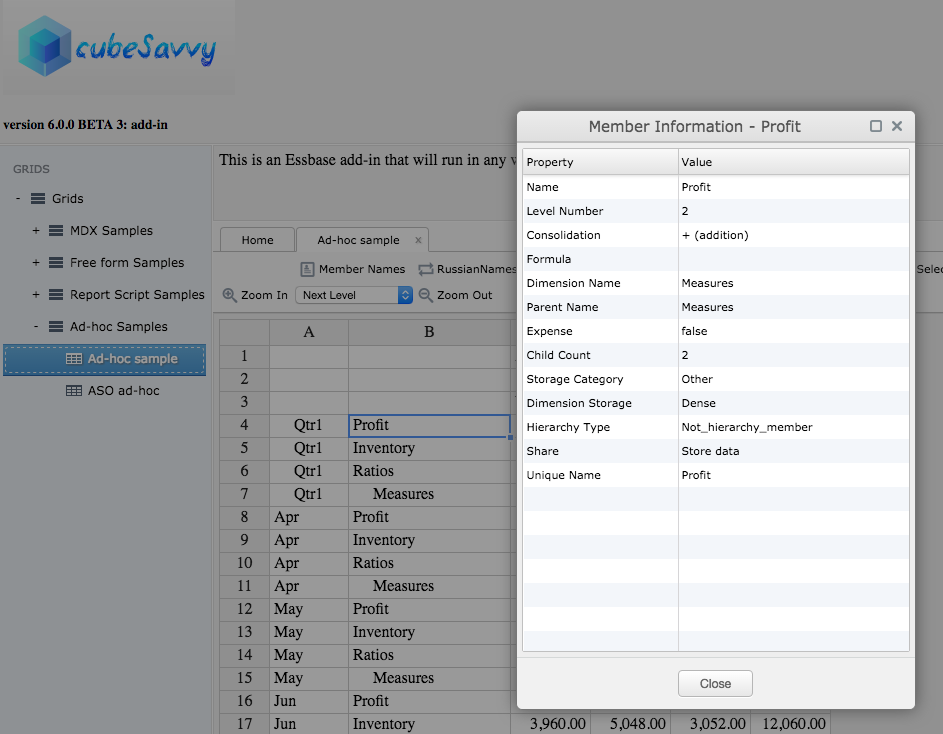
cubeSavvy double click adhoc operationsThe member information screen is pretty similar to the ones in the classic add-in and Smart View:
member information screenThe member selection screen is still a work-in-progress, but is functional. For example, the Search field currently only finds matches for members that are already displayed. It doesn't yet go back and search the database for other potential members that also match the entered criteria. That will be included in the next beta release. You might also wonder why the Alias column is showing Russian below. That is because the alias table chosen on the grid is RussianNames - you can see it in the background:
member selection screenSince I've now implemented the licensing functionality, I've decided to open up the beta to everyone. Therefore, I've made the beta 3 version the main cubeSavvy download.

Please let me know what you think in the comments.

-Harry

Friday, April 22, 2016

cubeSavvy add-in: beta update - Submit Data implemented

I've implemented Submit Data functionality for the second beta version, to be released tomorrow.

cubeSavvy add-in Submit Data functionality implemented


It also incorporates the feedback I've received from the current beta testers. The most common item mentioned has been to increase the number of rows in a retrieve from the current 20,000 limitation. I'm glad to announce that there is no limit now, besides the one imposed by Provider Services. And, in keeping with my focus on speed, performance is excellent, exceeding that of both Smart View and the classic add-in for large retrieves.

I've also finished perfecting the Save Changes option, to allow changes made to the grid during ad-hoc retrieval operations to be saved:


If you'd like to test the beta, please let me know and I'll make it available to you. I'll be sending out an update to the current beta testers tomorrow.

Thursday, April 14, 2016

cubeSavvy - add-in: beta this weekend

Just a short post, since I'm currently spending all of my limited free time working on development.

I'm shooting for releasing the first beta version of the cubeSavvy web-based Essbase add-in to testers this weekend. As a reminder, this version will only have retrieval capability. Ability to save data will come in the next beta release. Speed has been the major focus, and compares favorably to Smart View, and in some cases exceeds that of the classic add-in.

Please send me an email if you'd like to help test.

In the meantime, here's another brief video demonstrating basic functionality:


Sunday, April 3, 2016

cubeSavvy - the big one

Yes, this has been the plan all along: I'm creating a web-based Essbase add-in. My first attempt was the ill-fated Google Sheets Essbase add-on. I say this not because it was somehow technically-inferior. But because IT Information Security departments across the planet had a collective heart attack at the mere thought of poking a hole in the corporate firewall for Google traffic. Even though many of them had already done the same thing for Oracle XYZ Cloud Service.

cubeSavvy avoids this problem completely, by running inside the corporate firewall. In the latest, de rigueur terminology, it is an internal/private/corporate cloud application.
cubeSavvy allows users to retrieve Essbase data from any browser, on any platform (Windows, Mac, Linux, Unix), without having to install anything on their computer. No Excel, no DLLs, XLAs, .Net. Nada. Although it doesn't require Excel, data can easily be copied and pasted to/from it.

Users can also save their retrieves and administrators can make them visible to other users. This captures the primary functionality that drew me to Google Sheets - the ability to share Essbase data pulls.

As you can see in the short video below, the basic functionality is already working. Additional functionality like member selection, member information, pivot, zooming in to various levels/generations, etc. will be added next. Afterwards, the ability to save (i.e. lock & send) data will be implemented. One of the final steps will be to support mouse functions, like double-clicking and right-clicking.
cubeSavvy Essbase add-in
This version is not yet available for download, but will be coming within the next couple of weeks. Please send me an email if you'd like to participate in the beta program.

As the Grids structure in the video above shows, cubeSavvy already has the ability to create web-based grids using MDX queries and Report scripts. These grids can then be provisioned to users either with Shared Services groups or on a by-user basis:
user grid access screen
Grids can also have Page member drop-downs to allow one grid to be used for entering data to multiple member combinations:cubeSavvy_2_2

MDX and Report grids already have the ability to submit data. All data submissions, including the old value and new value, are also logged and reportable:
data_updates


Sunday, March 13, 2016

cubeSavvy Utilities 5.0 - multiple configuration files

Following are the bug fixes and enhancements released in version 5.0:

  • Bug Fixes
    • MDX
      • Saving the results of an MDX query to a file resulting in the string “null” in empty cells. This has been corrected.
      • Some unicode characters were incorrectly represented when saving the results of an MDX query to a file.
  • Enhancements
    • UI elements on each tab are now grouped by File Inputs (which do not require an Essbase connection) and Essbase Inputs.
    • Reverted back to the platform-specific look-and-feel, because several users sent me comments that the Java one was bugly.
    • Added the ability to choose which Alias table (or “All”) should be exported in the Essbase Inputs section of the Outline XML Parser tab. Previously only the default alias table was exported.
    • Ability to specify different configuration files (by far the most-requested feature).
      • As before, the cubeSavvyUtilities.conf file must reside in the config subdirectory of the cubeSavvyUtilities installation. 
      • An alternate conf file can now be specified, which can be located anywhere. 
        • An example from the new cubeSavvyUtilities.bat in the INSTALL_DIRECTORY: java -jar cubeSavvyUtilities.jar ./config/test.conf aso
      • The INSTALL_DIRECTORY/config/cubeSavvyUtilities.conf file will be used if no other conf file is specified.


The cubeSavvyUtilities.bat referenced above also provides a reference of how to do error-checking after each call is made. The full contents are below for reference:

@echo off
REM first check if Java available on system. exit if not
call :ProgInPath java.exe
if "%PROG%" == "" (
echo Java.exe not found in PATH
exit /b 1
)
REM The 3-character codes to pass into the jar file are as follows:
REM code conf file code GUI tab
REM ---- -------------- -------
REM aso ASOExportParser ASO Export Parser
REM out OutlineParser Outline XML Parser
REM mdx MDXQuery MDX Query
REM fil FileFilter File Filter
REM xml XMLOutlineEdit Outline XML Edit
REM Using the default configuration file, INSTALL_DIRECTORY/config/cubeSavvyUtilities.conf:
java -jar cubeSavvyUtilities.jar out
call :checkErrors
REM Specifying an alternate configuration file (the file doesn't have to reside under the
REM config directory):
java -jar cubeSavvyUtilities.jar ./config/test.conf aso
call :checkErrors

:ProgInPath
set PROG=%~$PATH:1
goto :eof
:checkErrors
IF %ERRORLEVEL% NEQ 0 (
  REM do something here to address the error. uncomment out 'exit' below to stop after first error
  echo we got a problem here: %ERRORLEVEL%
  REM exit 1
)


As usual, you can download cubeSavvy Utilities here.

Sunday, March 6, 2016

cubeSavvy – multiple calc scripts & grid descriptions

A couple of enhancements have been made in the 5.2 version now available for download:
  1. Now more than one calc script can be run on save. All COLUMN, ROW, and PAGE members are passed to each calc script, allowing for super-focused calculations/aggregations.
  2. Grids can now display a Description, visible to all users. Html tags are supported, so it's possible to link to other applications, files, and folders. Or you can just provide additional information, such as status, deadlines, or instructions.
A bug was also fixed that reset the Shared Services Groups selected in the Edit Grid screen below.

What functionality would you like to see next in cubeSavvy? Send me an email or leave a comment.
edit grid - with multiple calcs and description


grid displaying description for users

Sunday, February 28, 2016

cubeSavvy – data update view for admins

This point version update includes bug fixes for displaying MDX grids. Previously there was an issue with MDX statements that didn’t contain a WITH statement. 
For example, here's some MDX that contains a WITH statement:
WITH
set [secScenario] as '{[Actual],[Budget]}'
set [secMeasures] as '{Descendants([Margin]),Descendants([Total Expenses])}'
set [secMarket] as '{Descendants([Central]),[Texas],[California],Descendants([East])}'
set [secProduct] as '{Descendants([100])}'set [secYear] as '{Descendants([Qtr1]),Descendants([Qtr2])}'

SELECT crossjoin([secProduct],[secYear]) PROPERTIES MEMBER_ALIAS ON COLUMNS,
crossjoin([secMeasures],[secMarket]) PROPERTIES [RussianNames] ON ROWS,
[secScenario] ON PAGES
FROM Sample_U.Basic
What can I say? I always use them, so it didn’t even occur to me that people would just want to create all their sets in the ROW or COLUMN axis. But now you can also write your MDX queries like so:
select crossjoin(Descendants([100]),{Descendants([Qtr1]),Descendants([Qtr2])}) PROPERTIES MEMBER_ALIAS ON COLUMNS,
crossjoin({Descendants([Margin]),Descendants([Total Expenses])},{Descendants([Central]),[Texas],[California],Descendants([East])}) PROPERTIES [RussianNames] ON ROWS,
{[Actual],[Budget]} ON PAGES
FROM Sample_U.Basic

I'd like to say, however, that typing out the query above was even more painful than trying to read it later. Ok, I'll get off my MDX soapbox.
The one new, but very useful, feature is a User Data Updates view available to admin users:Data Updates screen
cubeSavvy has long had the ability to pass ROW, COLUMN, and/or PAGE member selections from grids to a calc script using RUNTIMESUBVARS. Now admins can even see the exact member intersection that was updated, along with the old value and the new one. The user who performed the update and the date/timestamp are also provided. All fields are searchable and sortable. You can also select multiple rows and ctrl-c copy them to other programs, such as Excel.
Download, enjoy, and let me know what you think.
-Harry

Sunday, February 14, 2016

cubeSavvy - stateless and localized

There are a couple of major components to this release. One of them is architecture-related, while the other is immediately visible in the user interface. Both of them will provide a solid base upon which to continue enhancing cubeSavvy. There are also a myriad of bug-fixes, as with any new version.
Prior to this release, I maintained a user’s Essbase connection the whole time they were logged in to cubeSavvy. This created issues when the Essbase session would time out. I’d always intended to modify cubeSavvy to be stateless, due to the scalability and portability benefits. Working out the best way took a little time, but I’m extremely happy with the results. Timeouts are a thing of the past! Sessions on the Essbase server are also minimized.
The other enhancement is visible right on the login page:
language selection


Russian is my second language. I’ve been speaking it for over 20 years now and actually have a BS degree in Russian Language and Literature (during which I studied in Russia for a year). Therefore, I’ve been pleasantly surprised by the interest in cubeSavvy from Russia. To make it easier for these users, I’ve chosen Russian as the first language for which to add localization.
Русский – мой второй язык. Уже 20 лет как его учу. Поэтому я приятно удивлен интересом со стороны пользователей в России. Чтобы русскоговорящим было легче с ним обращаться, я решил перевести cubeSavvy на русский язык.
Как видно внизу, не все элементы переведены. Если будет спрос, тогда я все остальное переведу
Home page in RussianIn addition to the Russian localization, the picture above demonstrates a new option on the Home screen that shows All Grids. In one table you can quickly see (and search/sort) the grid type (report script or mdx), application, database, calc script, assigned Shared Services groups, decimal places, and even the script behind the grid itself. Clicking on the grid on the left will populate the form on the right, where all the fields can be edited:
All Grids


As always, you can download cubeSavvy here.

Monday, November 23, 2015

cubeSavvy – security & grid storage

I’m introducing some major changes in this, the 3.0, version. Grids are no longer read directly from the Essbase application/database. This was too restrictive, both in terms of naming grids and grouping them by task, user, etc. Along the same lines, security is also needed to make sure only users who are authorized can access individual grids.
Adding a new grid or folder is as easy as clicking on an existing folder/grid. The applications and databases are read from the Essbase server, as are the calc scripts and Shared Services Groups.
add new grid in cubeSavvy 3.0
As hinted at by the above screenshot, security to a grid can be added based on Shared Services groups. Only those groups that have been provisioned to the selected Essbase application/database combination are displayed. The other way to control grid access is through user provisioning.
Admin users will see the User administration screen below on the Home tab. Only users who have Essbase server access will be displayed in the dropdown, which is searchable. Just type in the first few characters of the user who you’d like to add. There are only two User Types: admin and user. Only admins can edit grids and users. All of the columns are searchable and sortable.
user_screen_3_0Clicking the Edit User Access button for a selected user presents the following screen:
user grid access screen
The left panel displays the available grids to which the user doesn’t have access. The right panel shows the grids the selected user can access. Moving grids back and forth between the panels is as simple as clicking on them.
Ok, now that the administration details have been covered, let’s finally take a look at some grids. Six sample grids are included for instructional purposes. As can be seen clearly in the second screenshot above, you are no longer restricted by the 8-character limitation for non-Unicode Essbase report scripts. You can use up to 50 characters, with spaces, special characters, etc., in your names. Go wild!
The “calculated columns” sample grid is presented below:
calculated columns sample grid
I haven’t been doing a lot of Planning development lately, but I’m pretty sure it can’t produce this type of butterfly layout. Please let me know in the comments if I’m wrong. Don’t forget that cubeSavvy is using Essbase report scripts as the metadata/data presentation language. And report scripts can do some pretty cool things, like adding calculated columns, calculated rows, and rollups that are not in the underlying cube. First, let me show you the report script behind the above grid (by the way, it’s taken almost verbatim from the techref report script samples; I just added a Page dropdown):
calculated columns sample grid report script
The above report script demonstrates how to add 3 calculated columns (Actual~Qtr1, Budget~Q1, and Var~Q1). Why is this interesting? Because in the Year dimension of Demo/Basic there are no dynamically-calculated members. So Qtr1 is being updated solely through the report script (you can see that no calc script is attached to run on save – although this is still of course possible).
You can also use native report script functionality to create groupings that do not exist in the outline, as shown below in another sample grid:
create groupings not in outline
Not only are Northern Cities and Southern Cities grouped, but the totals for each are also displayed at the bottom. These are done on-the-fly when the Save Changes button is clicked. Again, this is taken from the techref samples, 15-B. To quote chapter and verse: “This sample report is a simple summary of information in a North/South grouping, which is not part of the database outline. When relationships that you need for reporting are missing in the database outline, often the best solution is to use calculated rows (or columns).”
You can download the latest version in the usual spot. Any feedback would be greatly appreciated.

Sunday, October 4, 2015

cubeSavvy - improved grid & tabs

I've just uploaded a new version of cubeSavvy. Improvements in the 2.2 version include:
  • Tabs. Now more than one grid can be open at the same time. This is a feature whose absence from Hyperion Planning has always baffled me. You can add graphs to a Planning form, but can't have two simple web forms open at the same time. The closest you can come is a composite form. In cubeSavvy you can open as many grids as you want. And speaking of grids...
  • Improved grid. The new grid allows dragging to copy the contents of cells, just as in Excel. Copying and pasting are also much easier and can be performed using the keyboard shortcuts you already know. The ability to undo changes (cmd-z or ctrl-z) has also been added.
  • Indentation in Page selection dropdowns. Now it's easier to determine the outline level of options in the selects. Those at level-0 have no indentation, whereas those at higher levels are indented according to their level.
  • Better handling of aliases. For example, the following commands are used before the Page layout is specified: 
    • <OUTALTSELECT "RussianNames"
    • { OUTALTNAMES } 
Please give the updated cubeSavvy a try and let me know what you think.
cubeSavvy_2_2