Showing posts with label cubeSavvy. Show all posts

Thursday, August 18, 2016

Russian installer

Почти половина посетителей этой страницы приходится на Россию. Получается конечно, что они уже умеют читать по-английски. Но кому не удобнее на своем родном языке?

Я давно начал переводить cubeSavvy на русский, но далеко не весь текст был переведён. Однако в этой последней версии (6.0.1) дела куда лучше обстоят с переводом. Практически всё на русском, так в самом cubeSavvy, как в инсталляционной программе.

Последную версию, как всегда, можно загрузить здесь.

И так, быстро пройдёмся по всем окнам инсталляционной программы. Начнём с самого начала - выбор языка:


Если выбрать Russian:


Настоятельно рекомендую выбрать каталог, в котором нет пробелов, а то программа может не запуститься:


Sunday, August 14, 2016

More about new features in production release

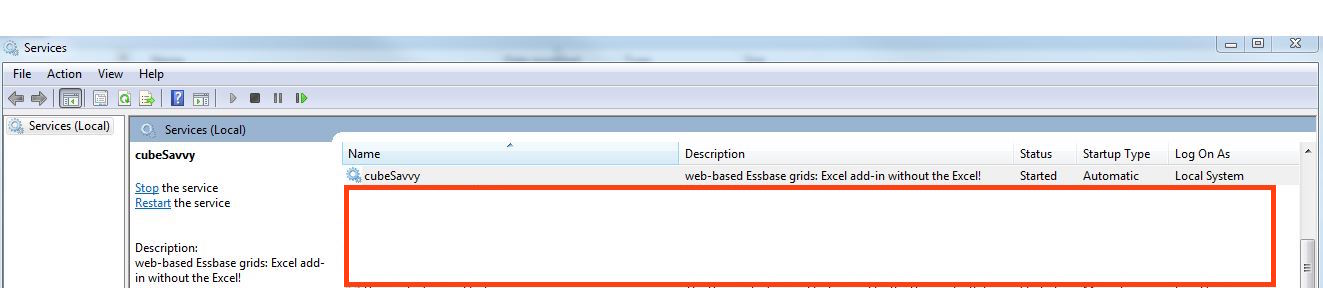
There are several new features that I'd like to call attention to in the production release. One of the most important, even though it's not visible to end users, is the installer's ability to create a Windows service. Previously, the only way to run cubeSavvy on Windows was to use the start.bat file. While very easy to use and understand, it had a major shortcoming - the DOS command window remained open as long as cubeSavvy was running. The window could easily be closed accidentally, ending the cubeSavvy session in the process. Also, it's just not a good practice from a system administration point of view to have open DOS windows for each process running on a server. The Windows service allows for stopping and starting cubeSavvy just as you would any other service.

cubeSavvy running as a Windows service
The next new feature of note is the ability to share ad-hoc grids with other cubeSavvy users. Administrators have always had this capability, using the "Users" - "Edit User Access" button of the "Home" tab. Now regular users can also share the grids they create. This is key: users can only share those grids that they themselves create. For such grids they have the option of giving fellow users either "Read/View" access or "Full Access". As the name implies, read access means that the grid appears in the user's list of grids on the left. The user can then open the grid, refreshing the retrieval contained therein. They can even modify the retrieval on the grid while they have it open, however, they do not have the ability to save their changes and make them visible to other users. Users with "Read" access to a grid are also not authorized to share it with other users. Only the creator of the grid, and admins, have this level of authorization.

share grid screen

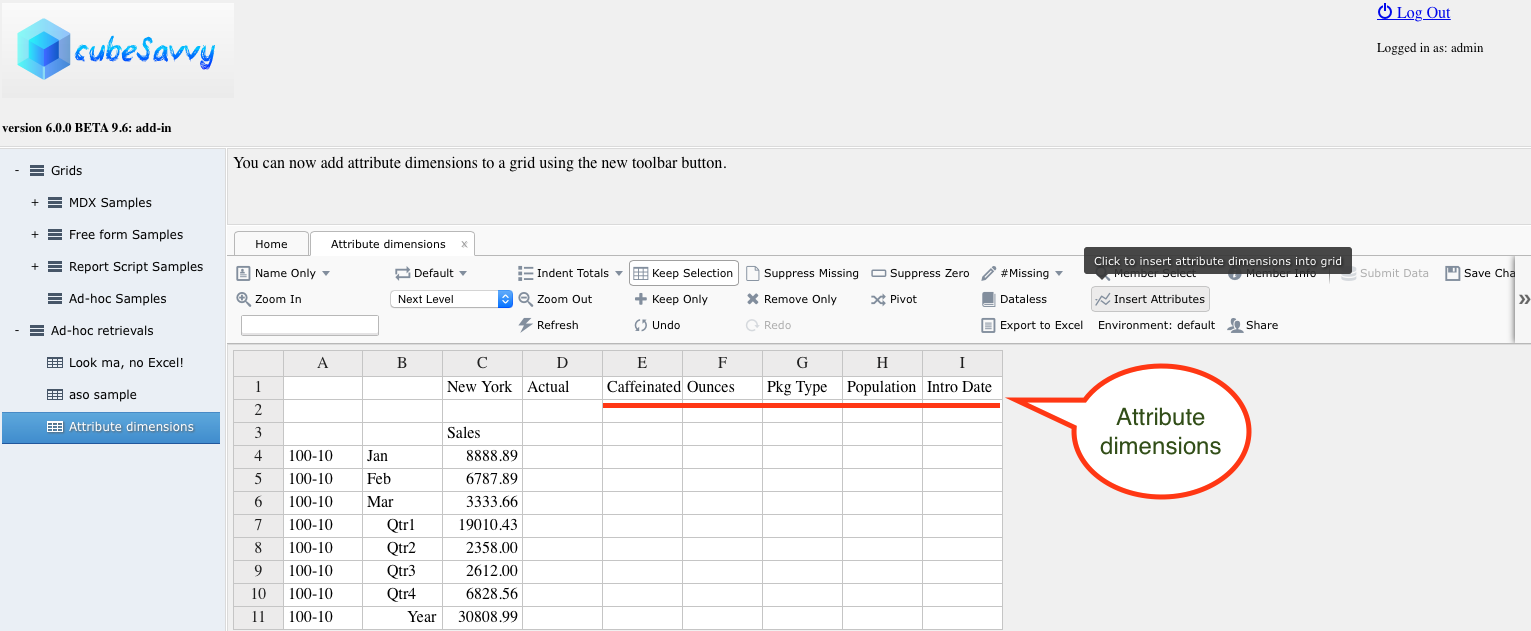
An "Insert Attributes" button has also been introduced. Clicking this button will add those attribute dimensions to the grid that are not already present. For example, using an ad-hoc grid based on Sample.Basic, if the retrieval already contains "Caffeinated_True"; "Ounces", "Pkg Type", "Population", and "Intro Date" will be added to the header row. If no attribute dimensions are currently present, they will all be added.

insert attributes button

The last enhancement is the "Environment" button, also for ad-hoc grids (are you seeing a trend here? ;-)). Clicking on this button presents a slide-out panel on the right of the grid. This panel displays most of the information available when creating or editing a grid: Environment, Application, Database, Calc script, Shared Services Groups, Comments, Description, and Decimal Places. A user with read access will see these options all grayed out, but can at least see the main settings for the grid. An admin user, the grid's creator, or a user with "Full Access" will be able to edit these fields and save the changes.

environment slide-out panel on grid

Give cubeSavvy a try. It has a 30-day free trial, so you have nothing to lose!

If you have any questions, please let me know in the comments.
Regards,
Harry

Sunday, July 31, 2016

Announcing the first cubeSavvy production release

I’m proud to announce the official production release of cubeSavvy 6.0.0. Almost four months in beta status has resulted in a battle-hardened, reliable product. I’d like to thank everyone who tested and provided feedback and/or suggestions. It was a tremendous help and I couldn’t have done it without you!
As I mentioned at Kscope, I will be charging a licensing fee for cubeSavvy. I know this goes somewhat against the grain in the Oracle EPM space, where free third-party tools abound. In fact, I myself offer the freely-available cubeSavvy Utilities on this website. So why then am I not making cubeSavvy available at no cost? The answer is simple – it’s the only way to determine if it actually provides value to users.
With that in mind, here is the value proposition for cubeSavvy as I see it:
  • Web-based. This gives it several inherent advantages over traditional client-server products:
    • No need to install on every user’s computer, with all the administrative and technical problems that inevitably entails.
    • Works on Windows, Mac OS, Linux, UNIX, as well as iOS and Android.
    • NONE of the Excel add-in issues inherent in the classic add-in and Smart View, such as:
      • Multiple instances of Excel preventing it from loading.
      • All manner of registry issues around DLLs.
      • Missing Excel menu item.
      • Inability to handle large queries. Smart View uses compression, but it’s compressing XML which is already a large, bloated data-transmission format. cubeSavvy is much more efficient.
      • Inexplicable Excel crashes. Oracle blames them on Microsoft, who in turn blames them on Oracle.
  • You get the best parts of Planning functionality: fixed forms, focused calculations, monitoring of user data input, etc. All without having to deal with Planning’s confusing architecture and tools and the administration nightmares they create. cubeSavvy allows you to just use Essbase without having to deal with Planning’s headaches.
  • Price. Save your organization hundreds of thousands, if not millions, of dollars. Oracle’s listed price for “Planning Plus” is $4,270 per user per year with a minimum of 25 users. That comes out to $106,750, minimum. Compare that to cubeSavvy, which would cost around $3,000 for the same number of users for the first year (and less than $2,000 for subsequent years) – and has no minimum number of users. Your organization is already spending a fortune on Essbase. Make the most of that investment!
  • Speed. Most users have reported retrievals are faster than Smart View. Some have even noticed speeds faster than the classic add-in!
  • Sharing. cubeSavvy allows users to create ad-hoc grids and share them with other users. No more emailing Excel retrieves or saving them to shared drives.
  • Faster development and support. We all have our horror stories with Oracle Support. Many people at Kscope even mentioned that they’ve completely stopped logging SRs, seeing it as an exercise in futility. Being a smaller, more agile company with a more compact, better-architected product allows for much faster response times. For example, during beta testing it wasn’t unusual to turn around major feature requests in less than a week. Bugs were squashed in mere hours, not quarters.
You can download cubeSavvy at the usual place. Try it out for a month with up to 10 users. Why not give it a test-drive given the above value it could bring to your organization?
If you have any questions or comments, please let me know.
Thanks,
Harry
harry.gates@cubeSavvy.com

Thursday, July 28, 2016

cubeSavvy web-based Essbase grids: beta 9.7 – Windows service

This beta release contains no changes to core cubeSavvy functionality. Rather, the installer received a major improvement in preparation for the upcoming production release. Now, when installing on Windows, a cubeSavvy service is automatically created. cubeSavvy can then be stopped and started like any other Windows service:

Please give it a whirl and let me know what you think.

As there have been no new reported issues (and all the others have been addressed), I’m currently planning on launching the production release by this Monday, August 1st. Look for several blog posts/videos in the coming days.

Sunday, July 24, 2016

cubeSavvy web-based Essbase grids: beta 9.6 – add attribute dimensions

I’ve been on vacation for the past 2 weeks, hence the lack of development/posts. I have had time, however, in the day since I’ve been back to add a requested feature – the ability to add attribute dimensions to an ad-hoc grid. Intuitively, only attribute dimensions that are not currently on the grid will be added.

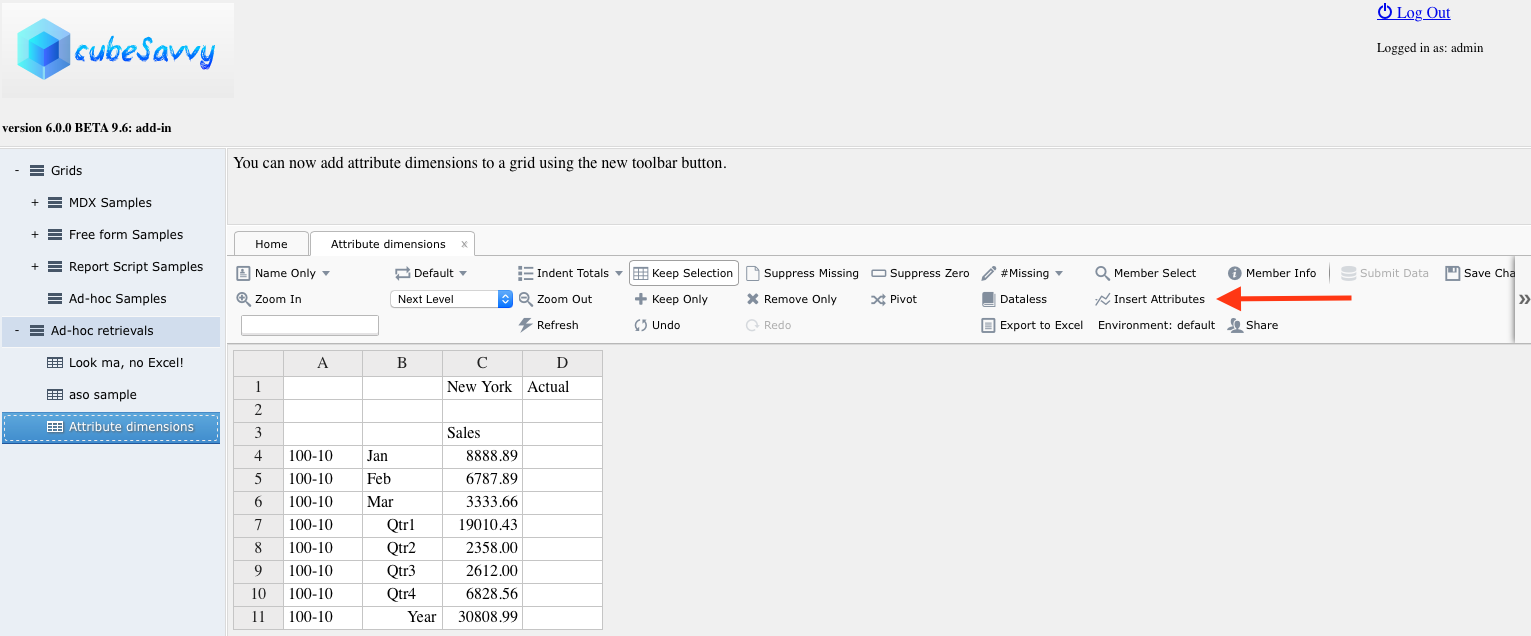
Here you can see an ad-hoc grid that doesn’t contain attribute dimensions, along with the new “Insert Attributes” button on the toolbar:

After clicking “Insert Attributes”:

Even those of you who aren’t interested in this feature will want to download this last release, since the license file in the prior version has expired and will no longer allow you to use the program.

The production release of cubeSavvy is still on-target for August. This is primarily due to the ongoing positive feedback received from beta testers, including in-person at Kscope in Chicago a few weeks ago. I really appreciate it, so please keep your comments and suggestions coming!

Saturday, June 18, 2016

cubeSavvy web-based Essbase grids: beta 9.5 – users can now create & share ad-hoc

version 6.0.0 BETA 9.5

Enhancements and improvements in this release and BETA 9.
  • Added ability for users to create ad-hoc grids.
    • Users no longer need to wait for an admin to create an ad-hoc grid for them. They can do so directly from the Home tab, using the 'New Adhoc grid' option.
    • Users can also edit and delete ad-hoc grids to which they have access.
  • Improvements made to Environments management when creating/editing grids.
  • Now only grids to which users have access are displayed in the Grids list on the left. As a reminder, there are three ways a user can have access to a grid:
    1. Through direct access given by an admin on the Users tab
    2. Through membership in a Shared Services group that has been assigned to a grid by an admin
    3. Through creating an ad-hoc grid themselves using the new functionality above
  • Added ability for users to share ad-hoc grids with other cubeSavvy users. I'm finally getting to some of the features I've been looking forward to creating since I started this project. Most of the features till this release have been recreating (and improving) functionality that Smart View already has. However, this ability to collaborate by sharing grids is something that you can't easily do in Excel, and hence in Smart View.

cubeSavvy will remain in beta for a little while longer to make sure that it's as stable and fast as possible. I'm tentatively targeting August for the 6.0.0 production release.

I'll be at KScope in Chicago in a couple of weeks. Please find me and say hi!

Sunday, June 5, 2016

cubeSavvy web-based Essbase grids: beta 8 – run calc scripts on ad-hoc submit data

Enhancements in this release:

Ability to run calc scripts on ad-hoc grids after Submit Data.

This functionality is the same as for MDX and Report Script grids: all the members for each dimension are passed to the report script, allowing for super-focused calculations/aggregations. Click on FAQ on the Home tab for more details, and an example.

I'll walk through a simple example.

First, select a calc script:
edit grid to select adhoc calc script

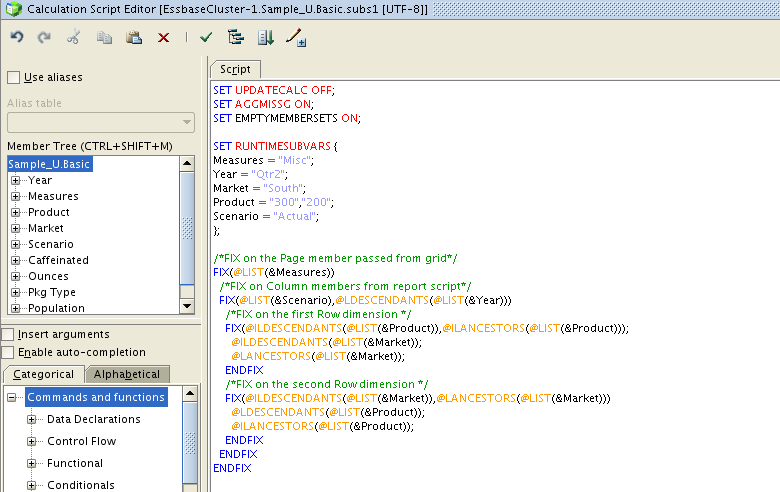
The "subs1" calc script above:
subs1 calc script attached to adhoc grid
Note the use of @IL and @L member selection commands. These take a @LIST (since there can be multiple members), which is passed in from the cubeSavvy grid on submit.

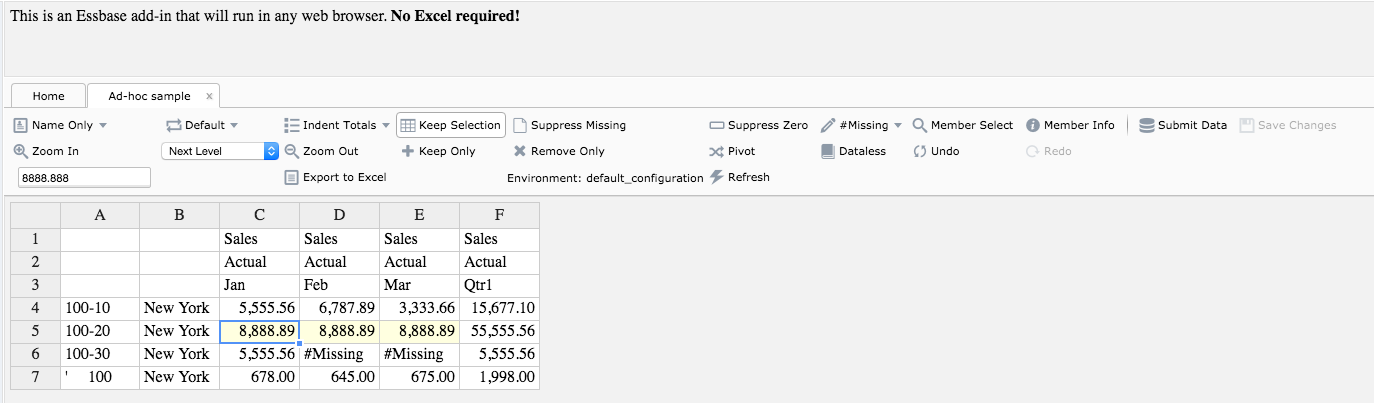
Data has been entered in an ad-hoc grid below, but has not yet been submitted (Submit Data).
entered data in grid but not submitted

After clicking Submit Data on the grid above, we can see that data has been aggregated:
calculated data after submit on adhoc grid

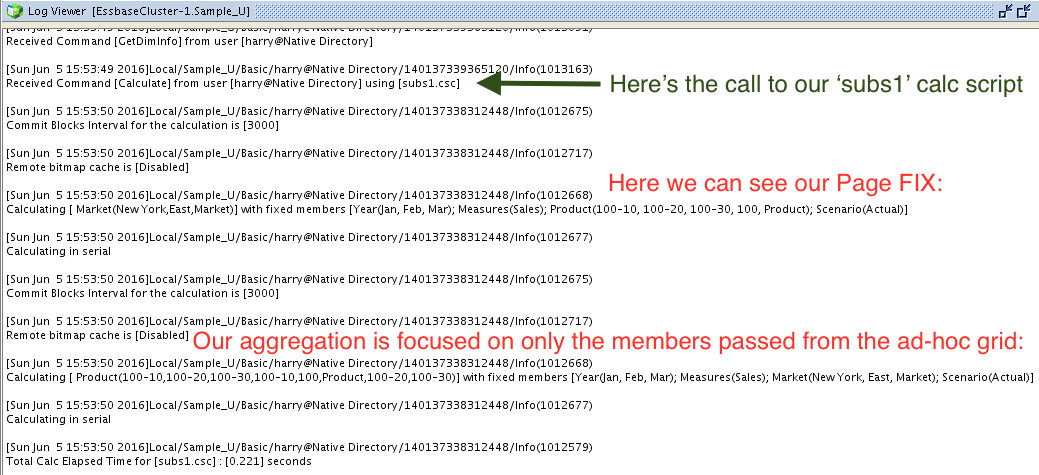
The Essbase log for our application (Sample_U.Basic) gives us the full details:
Sample_U.Basic log file showing our focused calc from adhoc grid

And we can get detail that the Essbase log fails to provide by looking at the "Data Updates" tab on the cubeSavvy Home page. Here we can see the full Member Intersection, along with the Old Value and New Value for each data point:
Data Submits screen showing submitted data and calc script run


Added Dataless Navigation


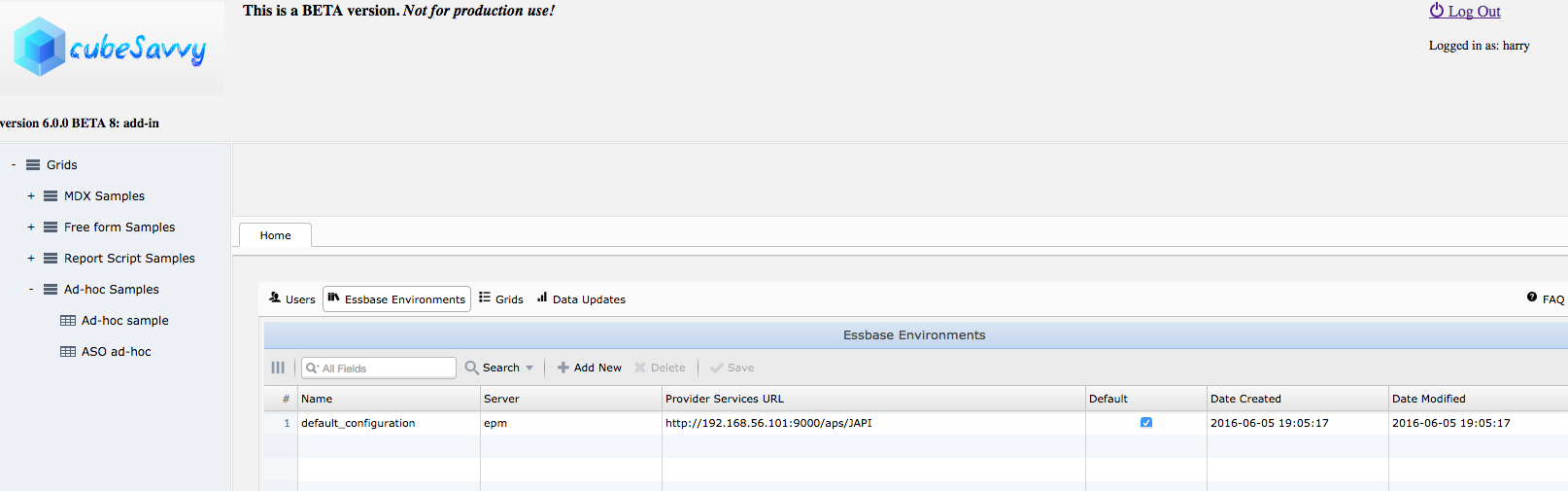
Improved administration of multiple Essbase environments

  • It's now much easier to add/edit/delete Essbase environments, directly from the Home page
  • The "default_configuration" below is the one set up in the installer. You can edit or delete it as you would any other environment. However, there must always be at least one environment. If you delete them all, the "default_configuration" will be added back the next time you start (start.bat/start.sh) the application.new environments management screen


I've decided to keep cubeSavvy in beta for a little while longer to make sure that it's as stable and fast as possible. Your feedback is still shaping the product. Please keep it coming! Download it here.

Sunday, May 29, 2016

cubeSavvy web-based Essbase grids: beta 7 - multiple Essbase environments

There are several small bug fixes and enhancements in this release. The major enhancement is the ability to add multiple Essbase environments for ad-hoc grids. Prior releases only allowed connecting to a single Essbase server/Provider services combination. That limitation has now been lifted.
  • Here's an excerpt from the cubeSavvy.conf file: The 'default' environment below is used to test whether a user has Essbase access to even log into cubeSavvy. The user should be provisioned in its Shared Services instance. The names are important (e.g. dev, test, main) since this will be displayed on grids. You can add as many environments as needed. At least one, however, is required as the default.
cubeSavvy.esbEnvironments {
default: prod,
dev {esbServer = "epmDev", esbProviderUrl = "http://192.168.56.101:9000/aps/JAPI"},
test {esbServer = "epmTest", esbProviderUrl = "http://192.168.56.102:9000/aps/JAPI"},
prod {esbServer = "epmProd", esbProviderUrl = "http://192.168.56.103:9000/aps/JAPI"}
}
  • By default the installer will prompt for, and fill in, the "main" environment values, like so:
cubeSavvy.esbEnvironments {
default: main,
main {esbServer = "epmMain", esbProviderUrl = "http://192.168.56.103:9000/aps/JAPI"}
}

To add additional environments, as above, you will need to manually edit the $INSTALL_DIR/cubeSavvy/conf/cubeSavvy.conf file.

This enhancement was requested by so many people, I decided to release one more beta to incorporate it.

Grid edit/setup:
environment now on grid edit tab

Prompt to log into environment when clicking on grid (only displays if you're not already logged into the particular environment):
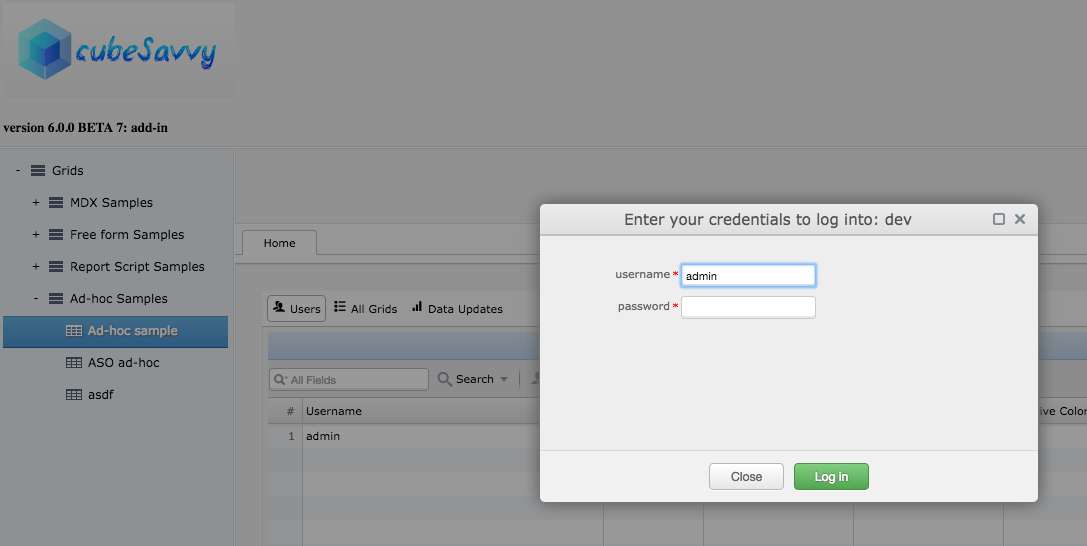
environment login prompt

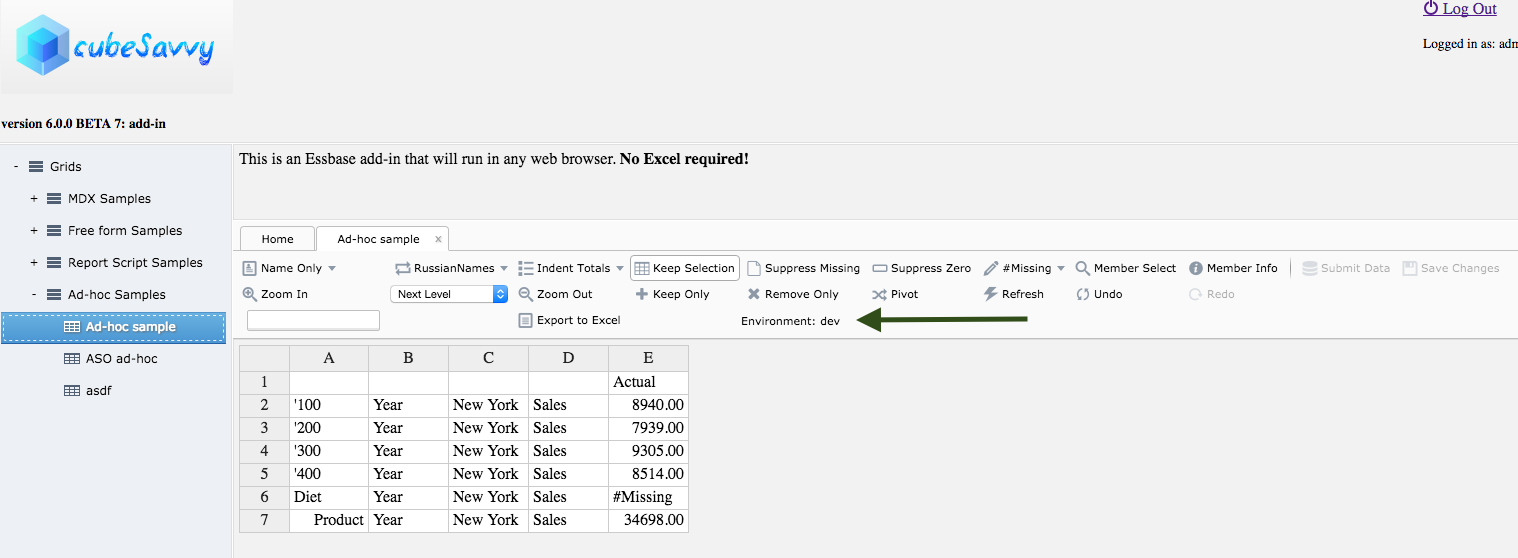
Environment indicated on ad-hoc grid:
environment indicator on grid

Sunday, May 8, 2016

cubeSavvy web-based Essbase grids: Beta 4 – more options

The following features were implemented for Beta 4:
  • Undo/Redo. In theory, the number of these operations is unlimited. In practice, browser memory is the limiting factor.
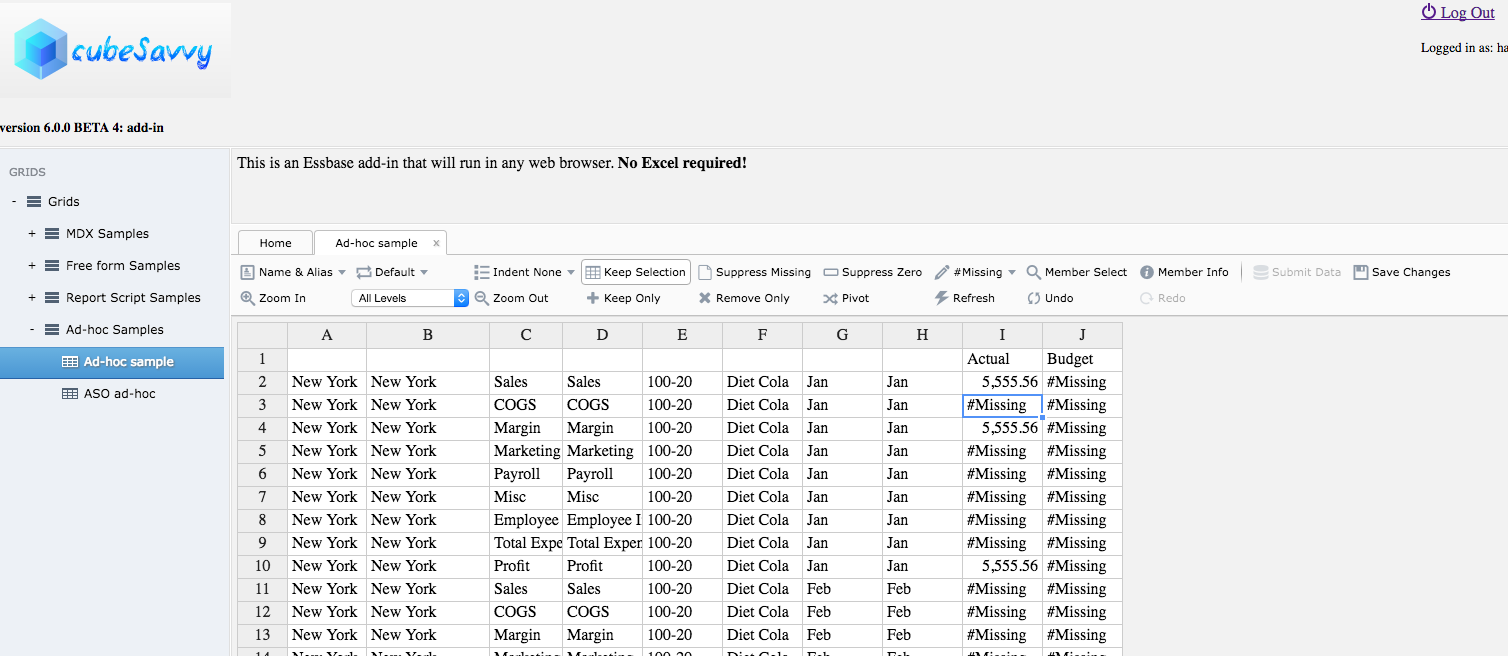
  • Display both member names and aliases on retrieves. The alias displayed is determined by the selection in the dropdown next to "Name & Alias", "Default" in this case.
member names and aliases in retrieve
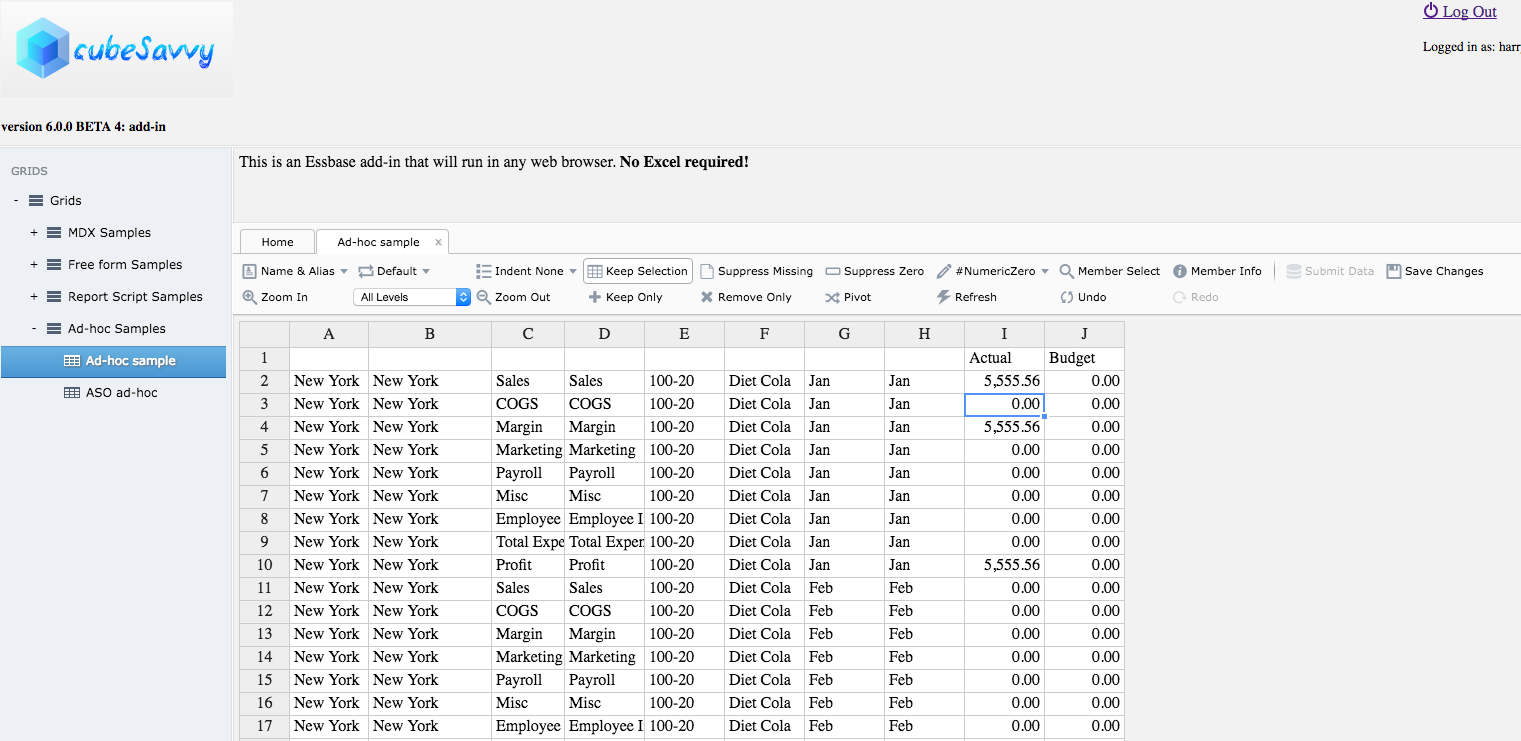
  • Choose #Missing text label or numeric value. The retrieve above with #NumericZero selected:
numeric zero instead of #Missing
  • Select indentation level: subitems, totals, or none. The retrieves above have "Indent None" applied. Previously, all retrieves used "Indent Subitems" exclusively. That remains the default, just as in the classic add-in and Smart View.
Please continue to provide your feedback. It really does let me know what I should work on next. So download Beta 4 and let me know what you think.
-Harry

Saturday, April 30, 2016

cubeSavvy web-based Essbase grids: Beta 3 - double clicks

version 6.0.0 BETA 3 Highlights
  • Implemented mouse actions, such as control button+double-clicking to zoom in and control+right double-clicking to zoom out. You have to press the control button (Ctrl on Windows) while double-clicking. This is necessary because plain double-clicking on a cell opens it for editing.
  • The first iteration of member information and member selection has also been included for testing.
  • Licensing. There is now a license.sec file under the conf directory. This file must be present, and valid, for cubeSavvy to start. For the beta, it allows 30 days of use for up to 10 users.
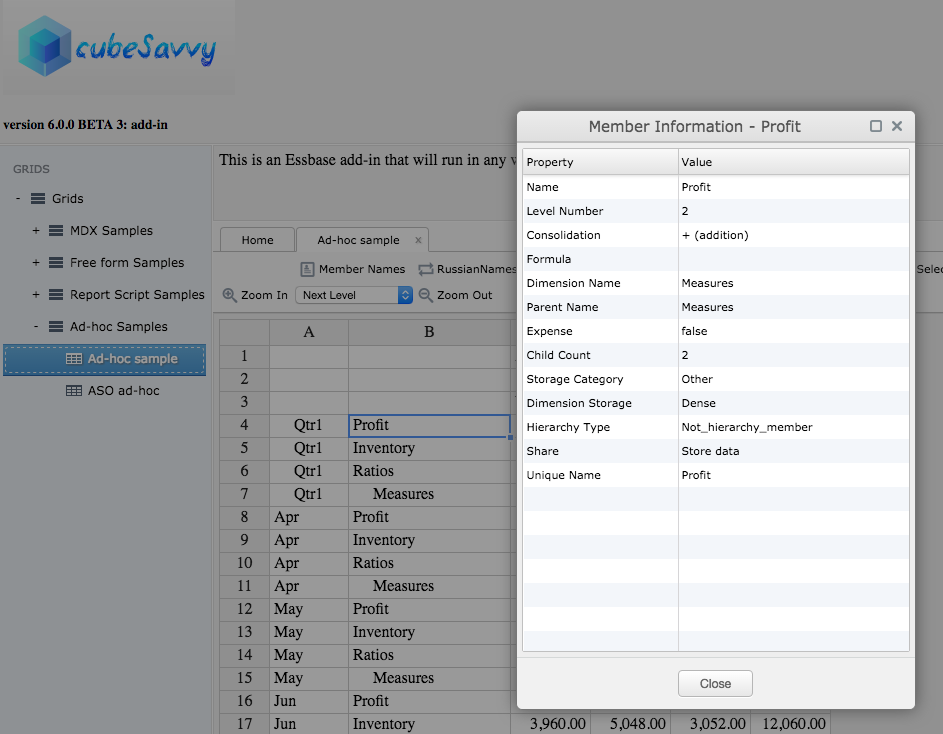
cubeSavvy double click adhoc operationsThe member information screen is pretty similar to the ones in the classic add-in and Smart View:
member information screenThe member selection screen is still a work-in-progress, but is functional. For example, the Search field currently only finds matches for members that are already displayed. It doesn't yet go back and search the database for other potential members that also match the entered criteria. That will be included in the next beta release. You might also wonder why the Alias column is showing Russian below. That is because the alias table chosen on the grid is RussianNames - you can see it in the background:
member selection screenSince I've now implemented the licensing functionality, I've decided to open up the beta to everyone. Therefore, I've made the beta 3 version the main cubeSavvy download.

Please let me know what you think in the comments.

-Harry

Friday, April 22, 2016

cubeSavvy add-in: beta update - Submit Data implemented

I've implemented Submit Data functionality for the second beta version, to be released tomorrow.

cubeSavvy add-in Submit Data functionality implemented


It also incorporates the feedback I've received from the current beta testers. The most common item mentioned has been to increase the number of rows in a retrieve from the current 20,000 limitation. I'm glad to announce that there is no limit now, besides the one imposed by Provider Services. And, in keeping with my focus on speed, performance is excellent, exceeding that of both Smart View and the classic add-in for large retrieves.

I've also finished perfecting the Save Changes option, to allow changes made to the grid during ad-hoc retrieval operations to be saved:


If you'd like to test the beta, please let me know and I'll make it available to you. I'll be sending out an update to the current beta testers tomorrow.

Thursday, April 14, 2016

cubeSavvy - add-in: beta this weekend

Just a short post, since I'm currently spending all of my limited free time working on development.

I'm shooting for releasing the first beta version of the cubeSavvy web-based Essbase add-in to testers this weekend. As a reminder, this version will only have retrieval capability. Ability to save data will come in the next beta release. Speed has been the major focus, and compares favorably to Smart View, and in some cases exceeds that of the classic add-in.

Please send me an email if you'd like to help test.

In the meantime, here's another brief video demonstrating basic functionality:


Sunday, April 3, 2016

cubeSavvy - the big one

Yes, this has been the plan all along: I'm creating a web-based Essbase add-in. My first attempt was the ill-fated Google Sheets Essbase add-on. I say this not because it was somehow technically-inferior. But because IT Information Security departments across the planet had a collective heart attack at the mere thought of poking a hole in the corporate firewall for Google traffic. Even though many of them had already done the same thing for Oracle XYZ Cloud Service.

cubeSavvy avoids this problem completely, by running inside the corporate firewall. In the latest, de rigueur terminology, it is an internal/private/corporate cloud application.
cubeSavvy allows users to retrieve Essbase data from any browser, on any platform (Windows, Mac, Linux, Unix), without having to install anything on their computer. No Excel, no DLLs, XLAs, .Net. Nada. Although it doesn't require Excel, data can easily be copied and pasted to/from it.

Users can also save their retrieves and administrators can make them visible to other users. This captures the primary functionality that drew me to Google Sheets - the ability to share Essbase data pulls.

As you can see in the short video below, the basic functionality is already working. Additional functionality like member selection, member information, pivot, zooming in to various levels/generations, etc. will be added next. Afterwards, the ability to save (i.e. lock & send) data will be implemented. One of the final steps will be to support mouse functions, like double-clicking and right-clicking.
cubeSavvy Essbase add-in
This version is not yet available for download, but will be coming within the next couple of weeks. Please send me an email if you'd like to participate in the beta program.

As the Grids structure in the video above shows, cubeSavvy already has the ability to create web-based grids using MDX queries and Report scripts. These grids can then be provisioned to users either with Shared Services groups or on a by-user basis:
user grid access screen
Grids can also have Page member drop-downs to allow one grid to be used for entering data to multiple member combinations:cubeSavvy_2_2

MDX and Report grids already have the ability to submit data. All data submissions, including the old value and new value, are also logged and reportable:
data_updates


Sunday, March 6, 2016

cubeSavvy – multiple calc scripts & grid descriptions

A couple of enhancements have been made in the 5.2 version now available for download:
  1. Now more than one calc script can be run on save. All COLUMN, ROW, and PAGE members are passed to each calc script, allowing for super-focused calculations/aggregations.
  2. Grids can now display a Description, visible to all users. Html tags are supported, so it's possible to link to other applications, files, and folders. Or you can just provide additional information, such as status, deadlines, or instructions.
A bug was also fixed that reset the Shared Services Groups selected in the Edit Grid screen below.

What functionality would you like to see next in cubeSavvy? Send me an email or leave a comment.
edit grid - with multiple calcs and description


grid displaying description for users

Sunday, February 28, 2016

cubeSavvy – data update view for admins

This point version update includes bug fixes for displaying MDX grids. Previously there was an issue with MDX statements that didn’t contain a WITH statement. 
For example, here's some MDX that contains a WITH statement:
WITH
set [secScenario] as '{[Actual],[Budget]}'
set [secMeasures] as '{Descendants([Margin]),Descendants([Total Expenses])}'
set [secMarket] as '{Descendants([Central]),[Texas],[California],Descendants([East])}'
set [secProduct] as '{Descendants([100])}'set [secYear] as '{Descendants([Qtr1]),Descendants([Qtr2])}'

SELECT crossjoin([secProduct],[secYear]) PROPERTIES MEMBER_ALIAS ON COLUMNS,
crossjoin([secMeasures],[secMarket]) PROPERTIES [RussianNames] ON ROWS,
[secScenario] ON PAGES
FROM Sample_U.Basic
What can I say? I always use them, so it didn’t even occur to me that people would just want to create all their sets in the ROW or COLUMN axis. But now you can also write your MDX queries like so:
select crossjoin(Descendants([100]),{Descendants([Qtr1]),Descendants([Qtr2])}) PROPERTIES MEMBER_ALIAS ON COLUMNS,
crossjoin({Descendants([Margin]),Descendants([Total Expenses])},{Descendants([Central]),[Texas],[California],Descendants([East])}) PROPERTIES [RussianNames] ON ROWS,
{[Actual],[Budget]} ON PAGES
FROM Sample_U.Basic

I'd like to say, however, that typing out the query above was even more painful than trying to read it later. Ok, I'll get off my MDX soapbox.
The one new, but very useful, feature is a User Data Updates view available to admin users:Data Updates screen
cubeSavvy has long had the ability to pass ROW, COLUMN, and/or PAGE member selections from grids to a calc script using RUNTIMESUBVARS. Now admins can even see the exact member intersection that was updated, along with the old value and the new one. The user who performed the update and the date/timestamp are also provided. All fields are searchable and sortable. You can also select multiple rows and ctrl-c copy them to other programs, such as Excel.
Download, enjoy, and let me know what you think.
-Harry

Sunday, February 14, 2016

cubeSavvy - stateless and localized

There are a couple of major components to this release. One of them is architecture-related, while the other is immediately visible in the user interface. Both of them will provide a solid base upon which to continue enhancing cubeSavvy. There are also a myriad of bug-fixes, as with any new version.
Prior to this release, I maintained a user’s Essbase connection the whole time they were logged in to cubeSavvy. This created issues when the Essbase session would time out. I’d always intended to modify cubeSavvy to be stateless, due to the scalability and portability benefits. Working out the best way took a little time, but I’m extremely happy with the results. Timeouts are a thing of the past! Sessions on the Essbase server are also minimized.
The other enhancement is visible right on the login page:
language selection


Russian is my second language. I’ve been speaking it for over 20 years now and actually have a BS degree in Russian Language and Literature (during which I studied in Russia for a year). Therefore, I’ve been pleasantly surprised by the interest in cubeSavvy from Russia. To make it easier for these users, I’ve chosen Russian as the first language for which to add localization.
Русский – мой второй язык. Уже 20 лет как его учу. Поэтому я приятно удивлен интересом со стороны пользователей в России. Чтобы русскоговорящим было легче с ним обращаться, я решил перевести cubeSavvy на русский язык.
Как видно внизу, не все элементы переведены. Если будет спрос, тогда я все остальное переведу
Home page in RussianIn addition to the Russian localization, the picture above demonstrates a new option on the Home screen that shows All Grids. In one table you can quickly see (and search/sort) the grid type (report script or mdx), application, database, calc script, assigned Shared Services groups, decimal places, and even the script behind the grid itself. Clicking on the grid on the left will populate the form on the right, where all the fields can be edited:
All Grids


As always, you can download cubeSavvy here.

Monday, November 23, 2015

cubeSavvy – security & grid storage

I’m introducing some major changes in this, the 3.0, version. Grids are no longer read directly from the Essbase application/database. This was too restrictive, both in terms of naming grids and grouping them by task, user, etc. Along the same lines, security is also needed to make sure only users who are authorized can access individual grids.
Adding a new grid or folder is as easy as clicking on an existing folder/grid. The applications and databases are read from the Essbase server, as are the calc scripts and Shared Services Groups.
add new grid in cubeSavvy 3.0
As hinted at by the above screenshot, security to a grid can be added based on Shared Services groups. Only those groups that have been provisioned to the selected Essbase application/database combination are displayed. The other way to control grid access is through user provisioning.
Admin users will see the User administration screen below on the Home tab. Only users who have Essbase server access will be displayed in the dropdown, which is searchable. Just type in the first few characters of the user who you’d like to add. There are only two User Types: admin and user. Only admins can edit grids and users. All of the columns are searchable and sortable.
user_screen_3_0Clicking the Edit User Access button for a selected user presents the following screen:
user grid access screen
The left panel displays the available grids to which the user doesn’t have access. The right panel shows the grids the selected user can access. Moving grids back and forth between the panels is as simple as clicking on them.
Ok, now that the administration details have been covered, let’s finally take a look at some grids. Six sample grids are included for instructional purposes. As can be seen clearly in the second screenshot above, you are no longer restricted by the 8-character limitation for non-Unicode Essbase report scripts. You can use up to 50 characters, with spaces, special characters, etc., in your names. Go wild!
The “calculated columns” sample grid is presented below:
calculated columns sample grid
I haven’t been doing a lot of Planning development lately, but I’m pretty sure it can’t produce this type of butterfly layout. Please let me know in the comments if I’m wrong. Don’t forget that cubeSavvy is using Essbase report scripts as the metadata/data presentation language. And report scripts can do some pretty cool things, like adding calculated columns, calculated rows, and rollups that are not in the underlying cube. First, let me show you the report script behind the above grid (by the way, it’s taken almost verbatim from the techref report script samples; I just added a Page dropdown):
calculated columns sample grid report script
The above report script demonstrates how to add 3 calculated columns (Actual~Qtr1, Budget~Q1, and Var~Q1). Why is this interesting? Because in the Year dimension of Demo/Basic there are no dynamically-calculated members. So Qtr1 is being updated solely through the report script (you can see that no calc script is attached to run on save – although this is still of course possible).
You can also use native report script functionality to create groupings that do not exist in the outline, as shown below in another sample grid:
create groupings not in outline
Not only are Northern Cities and Southern Cities grouped, but the totals for each are also displayed at the bottom. These are done on-the-fly when the Save Changes button is clicked. Again, this is taken from the techref samples, 15-B. To quote chapter and verse: “This sample report is a simple summary of information in a North/South grouping, which is not part of the database outline. When relationships that you need for reporting are missing in the database outline, often the best solution is to use calculated rows (or columns).”
You can download the latest version in the usual spot. Any feedback would be greatly appreciated.